|
In this tutorial I'll show you about multimedia
programming using python. Here I'll just try to explain
the aspects involved in multimedia programming using python.
Before you proceed let me clear that what I mean by
multimedia programming. Here we try to integrate different
media applications in to one application which in turn can be
called as a multimedia application. This tutorial does not
describes the deep concepts of GUI & audio programming but it
is concerned about how to mix these two. So I recommend you to
refer the home pages of respective modules used in this
tutorial for a deeper understanding of those modules. And most
importantly you need to be familiar with python programming to
understand this tutorial
Python in it self so simple & easy to learn. If you are
already a programmer it'll be more easy. To program some
good applications in a short span is to use already
existing modules for that. If you want to be productive avoid
working at low level programming. you can follow the links in
link section of this site to see various tutorials
on python. But
http://python.org in it self
will be a good help. Python language comes with a 'batteries
included' facility, which helps us to avoid reinventing the wheel.
Its a common knowledge that most of the
multimedia applications will have a good front end making the
life easier for an end user. That is, end user expects a good
graphical mode interaction for any application he uses. This fontend is called GUI , which expands in to Graphical User
Interface.
Although there are different good looking GUI toolkits
availble for
python like GTK, Qt, wxPython. Tkinter will be a good step to
start with.Tkinter is considered to be the de facto GUI
toolkit for python. As it doesn't overwhelm you when you program.
Moreover Tkinter is the true platform independent one, when
compared to the rest of the toolkits. And one redeeming fact
about it is, Tkinter is bundled with most of the standard
python distributions.
If you can visit pythons wiki there you will find loads of
links for these things. A simple & shortest GUI program
in python using TKinter will be
########program 1################
from Tkinter import*
root=Tk()
Label(text='Hello World').pack()
root.mainloop()
##############################
The above simple code will display the following figure on
your monitor.

So by using above code we have wished the
world in a graphical mode.
In
the above section we have seen how to program a graphical
application. So the visual aspect is completed, now the thing
remaining is to enable our program to make some sounds, or
here we will simply play an audio file. When it comes to audio
programming in python,things gets difficult if we use built in
multimedia modules of python cause they are not portable. So
we have to select a cross-platform module like pySonic, Snack,
or pymedia and finally pygame depending on our requirement.
requirement in the sense is say for example Snack module is
best suited for audio processing, pySonic is best suited for
audio playback & recording applications etc etc.
Now lets take pySonic module, here we are concerned about
integrating different forms of media applications to make our
program a multimedia capable one. Now look at the following
example.
#############program 2########################
import pySonic, time
# create the world
w = pySonic.World()
# create two sources
src = pySonic.Source()
# load audio from disk. type the name of audio file you want
to play in place of 'sample.wav'
src.Sound = pySonic.FileSample('sample.wav')
# sleep while playing
src.Play()
while src.IsPlaying():
time.sleep(0.5)
###########################################
If every thing goes well you'll listen to the file being
played. Now our job is to simply mix the two types of media.
Here is the code to do that.
###############program 3###############################
import pySonic
from Tkinter import*
root=Tk()
w=pySonic.World()
src=pySonic.Source()
src.Sound=pySonic.FileStream("sample.mp3")
def play():
src.Play()
def stop():
src.Stop()
Button(text='play',command=play).pack()
Button(text='stop',command=stop).pack()
root.mainloop()
####################################################
Now the above code generates a small multimedia application as
shown below
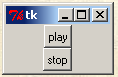
If you click on play button the
same happens what we have done in program 2 but now in a
aesthetic manner. This is in no way a neat tutorial but I'll updating this.
If you want to know in detail or about things which time
didn't allowed me to explain here, feel free to mail me those
queries.
Happy Hacking,
Godson Gera
|